Physical Address
304 North Cardinal St.
Dorchester Center, MA 02124
Physical Address
304 North Cardinal St.
Dorchester Center, MA 02124


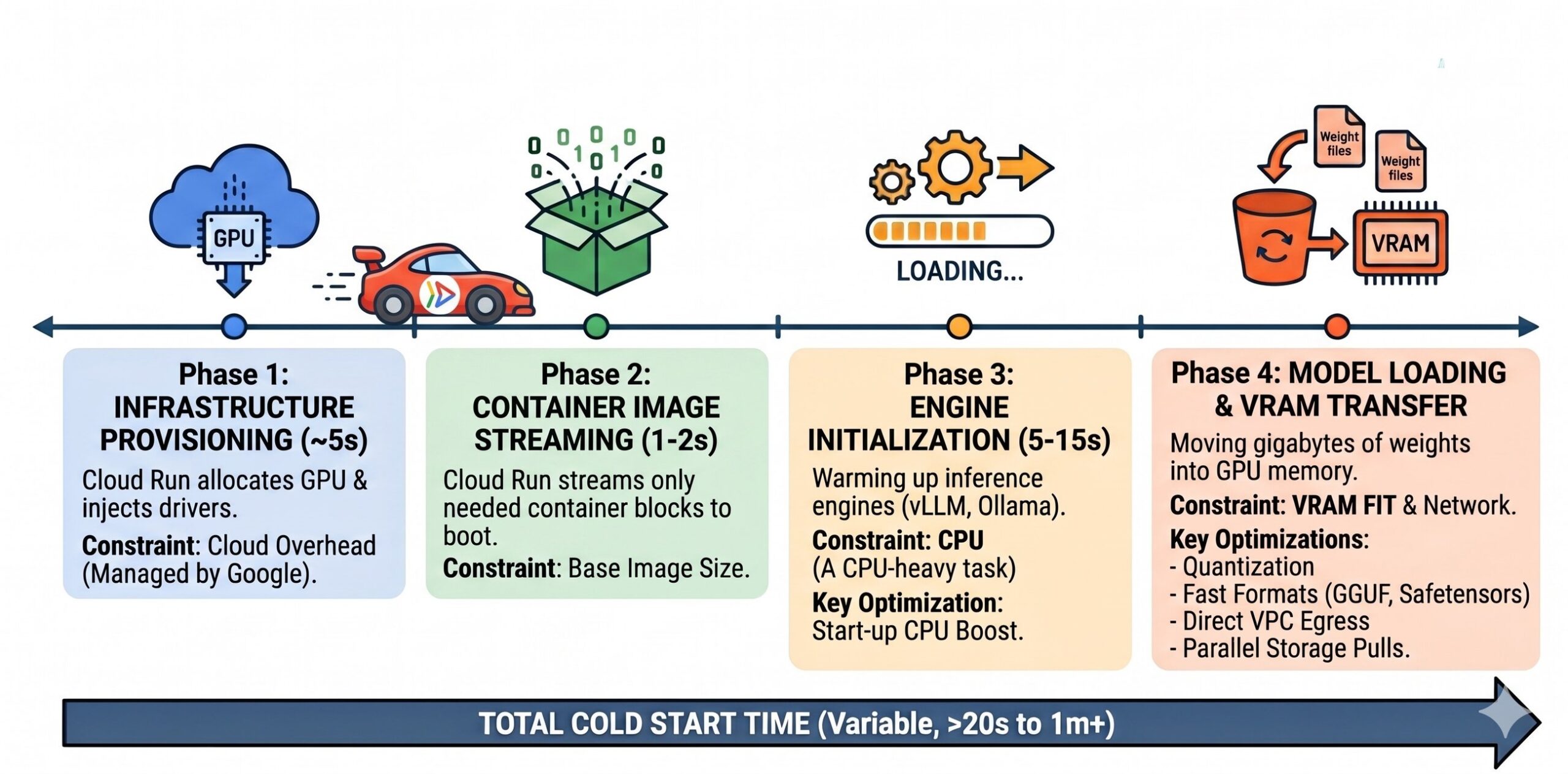
在 Cloud Run 上跑 AI 模型,冷启动 20 秒的延迟足以让用户流失。问题的根源不在模型本身,而在于对 GPU 基础设施的处理方式。
AI 冷启动分为四个阶段:基础设施配置(约 5 秒)、容器镜像流式传输(1-2 秒)、引擎初始化(5-15 秒,CPU 密集型)、模型权重加载到 VRAM(最终瓶颈)。每个阶段都有对应的优化手段:Phase 3 用 Startup CPU Boost 临时翻倍 CPU;Phase 4 用 Cloud Storage 并发下载替代 FUSE 或镜像内嵌;4-bit 量化直接减少需要传输的数据量;Safetensors 替代 pickle 实现零拷贝加载。
并发调优是避免冷启动的关键。通过公式 (模型实例数 × 并行查询数) + (模型实例数 × 批处理大小) 计算最大并发数,让单个热实例尽可能多地处理请求,从而减少扩容触发。Elastic 的做法是把每个独立工作负载(模型+任务适配器+流量特征)拆成独立服务,配合 enforce_eager=True 换取更快的冷启动,最终在 17+ 模型变体上实现日均百万级请求。
I saw a developer asking on Reddit if there was any “sane way” to manage Cloud Run cold starts for AI across multiple regions. They were experiencing startup latencies of up to 20 seconds, a frustrating gap where the infrastructure is spinning up while the user waits for a response. The discussion was full of developers who had almost given up on serverless GPUs, with some even migrating back to GKE just to escape the latency. I decided it was time to dive deep into the Mechanics of AI Cold Starts and see if we could find that “sane way.” During my research into hosting models like Gemma 4 on Cloud Run, I had the privilege of co-presenting at Google Cloud Next ’26 with Oded Shahar (Senior Engineering Manager for Cloud Run) and our guest speaker Ajay Nair (Global VP of Platform at Elastic).